
How Many Types of Cloud Storage Are There?

The types of cloud storage are public cloud storage, private cloud storage, hybrid cloud storage, and community cloud storage.
Cloud storage has become a common part of everyday life. From storing family photos to managing company files, it gives people and businesses the convenience of accessing data anytime, anywhere. But not all cloud storage is the same. There are different types of cloud storage, each designed to meet specific needs. Some are built for personal use, while others are designed to handle the complex demands of businesses.
Understanding these types helps you pick the one that fits best.
Main Types of Cloud Storage
Public Cloud Storage
Public cloud storage is owned and operated by third-party providers. The data is stored in a shared environment where multiple users can access services.
- Who it suits: Students, freelancers, and small businesses who want low-cost storage without having to worry about maintenance.
- Why it works: Users only pay for the space they need, and scaling up is easy.
Example: Imagine a college student storing project files and photos in a public cloud. They don’t need private servers or extra security measures, its just easy access and affordability.
Private Cloud Storage
Private cloud storage is dedicated to a single user or business. It offers complete control and higher security compared to the public option.
- Who it suits: Companies dealing with sensitive data, such as healthcare or finance.
- Why it works: Since the storage is private, businesses don’t share space with others, reducing risks.
Example: A law firm might use private cloud storage to manage confidential case files, ensuring they remain secure and accessible only to authorized staff.
Also Read, Which is The Best Cloud Storage Services Providers?
Hybrid Cloud Storage
Hybrid cloud storage combines public and private systems. It allows organizations to keep sensitive data in a private setup while using the public cloud for less critical tasks.
- Who it suits: Businesses that need flexibility without spending too much.
- Why it works: Hybrid models let companies balance cost savings with data protection.
Example: A media company may store raw video files on a public cloud to save money but keep contracts and employee records in a private system.
Community Cloud Storage
Community cloud storage is shared among organizations with similar goals or regulations. It is less common but valuable for groups working on joint projects.
- Who it suits: Universities, research institutes, or government departments.
- Why it works: It allows collaboration without each organization building its own private storage.
Example: A group of hospitals may use community cloud storage to share patient data for research while meeting healthcare compliance rules.
Storage Models Within Cloud Storage
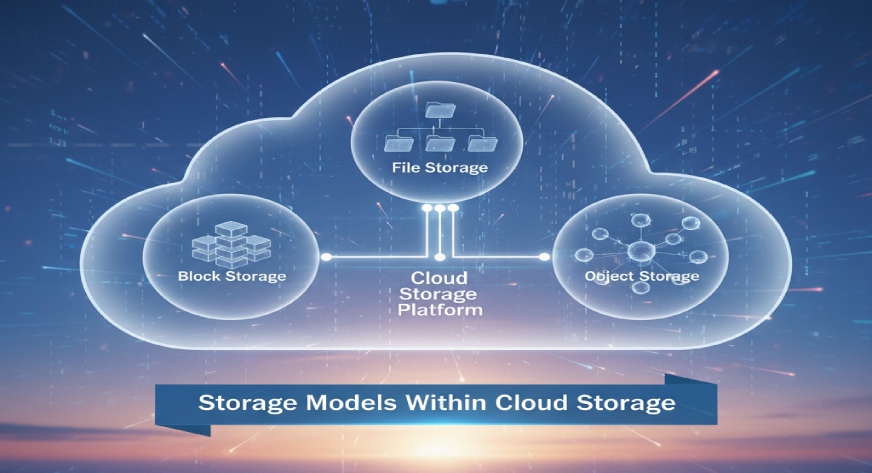
Apart from the main categories above, there are also different cloud storage types based on how data is structured and managed.
Block Storage
Block storage divides data into fixed-sized blocks. It is fast and efficient, making it a good choice for databases or high-performance applications.
Example: Banks using block storage to run large databases with quick transaction processing.
File Storage
File storage works just like saving files on your computer, only it’s stored in the cloud. It uses a simple directory and folder system, which makes it easy to organize and access.
Example: A design team storing and sharing project files with colleagues in different cities.
Object Storage
Object storage handles large amounts of unstructured data such as videos, photos, or backups. It assigns each file a unique identifier, making retrieval simple.
Example: Social media platforms use object storage to manage billions of images and videos uploaded by users daily.
Which Type of Cloud Storage is Right for You?
With so many cloud storage types available, it’s natural to wonder which one will fit your needs. The right choice depends on factors like how much data you handle, who needs access, and how sensitive that data is. Let’s look at common scenarios to make it clearer:
For Personal Users
If you just need storage for photos, music, personal files, or school projects, public cloud storage is often enough. It’s affordable, easy to set up, and doesn’t require technical expertise. For example, a student storing lecture notes and group assignments can easily share and collaborate without worrying about costs.
For Freelancers and Startups
Small teams or independent professionals may want flexibility without heavy costs. A hybrid cloud storage setup makes sense here, you can use public cloud for large but non-sensitive files (like design drafts or video projects) while keeping contracts or invoices in a private setup.
For Small and Medium Businesses (SMBs)
SMBs often juggle affordability with the need for security. Hybrid storage again works well, but some may start shifting toward private storage if they handle client data. For instance, an online shop may store product photos publicly but keep customer payment records in a secure private system.
For Large Enterprises
Enterprises dealing with huge volumes of confidential data, like banks, hospitals, or IT firms, benefit the most from private cloud storage. It ensures compliance with industry rules and gives full control over data. For example, a hospital handling patient reports cannot afford to store such files on a shared public environment.
Final Thoughts
The different types of cloud storage are designed to serve different purposes. Public storage keeps things simple and affordable, private storage ensures top security, hybrid offers flexibility, and community brings collaboration. Beyond that, storage models like block, file, and object storage give further options depending on the kind of data being managed.
The key is to match your storage choice with your goals. Whether you’re an individual looking for convenience or a business aiming for efficiency and safety, understanding the options makes the decision much easier.
If you’re exploring smart ways to manage cloud-based workflows, Manju by WebWorks Co. can help. It’s designed to simplify storage and collaboration without overwhelming you with technical details, keeping things smooth, practical, and reliable.
Frequently Asked Questions
Q1. Which cloud storage is faster?
Athena Cloud, Google Drive and Dropbox are generally considered the fastest cloud storage services due to their high-speed syncing and reliable performance.
Q2. What are the 4 types of storage?
The four main types of storage are:
Cloud storage
Primary storage (RAM)
Secondary storage (HDD/SSD)
Tertiary storage (tapes, archival storage)
